 Fordel Studios
Observability-Driven Development
Observability is not monitoring with better branding. Monitoring tells you when something breaks. Observability lets you understand why it broke — and why it is slow, and why that one user's experience differs from everyone else's.
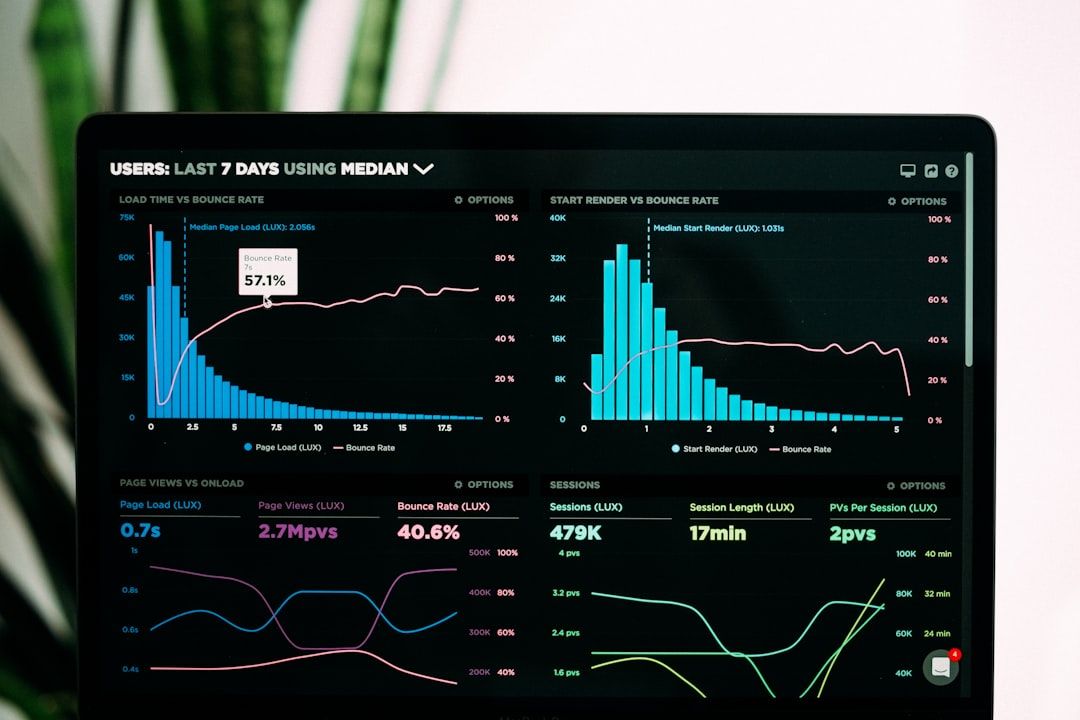
The shift from monitoring to observability is a shift from known-unknowns to unknown-unknowns. Monitoring checks predefined conditions: is CPU above 80%? Is the error rate above 1%? Is the response time above 500ms? Observability lets you ask arbitrary questions of your system without having anticipated those questions in advance.
This distinction matters because modern distributed systems fail in ways that cannot be predicted. A request that traverses 15 microservices, 3 databases, 2 caches, and an AI model inference endpoint has thousands of potential failure modes. You cannot write a monitoring check for each one. You need the ability to trace a single request through the entire system and understand its behavior.
The Three Pillars (and Why They Are Not Enough)
The traditional framing of observability centers on three pillars: logs, metrics, and traces. This framing is useful but incomplete.
Logs capture discrete events. Metrics capture aggregated measurements over time. Traces capture the journey of a single request through distributed services. The insight comes from correlating all three: a metric shows latency increased, a trace pinpoints which service introduced the latency, and a log from that service reveals the root cause.
OpenTelemetry: The Convergence
OpenTelemetry (OTel) has become the standard for instrumenting applications. It provides a vendor-neutral SDK for generating traces, metrics, and logs, with exporters for every major observability backend (Datadog, Grafana, Honeycomb, New Relic, Jaeger). The key insight behind OTel is that instrumentation should be separated from the observability backend — instrument once, export to any vendor.
For AI applications, OTel is particularly valuable because AI pipelines are inherently distributed: an API request triggers RAG retrieval, prompt construction, model inference, output parsing, and response formatting — each potentially running on different services. OTel traces capture this entire chain with timing, input/output sizes, and error states at each step.
- HTTP server and client libraries (auto-instrumentation available for most frameworks)
- Database clients — query timing, connection pool metrics, query text for slow query analysis
- LLM API calls — model name, token count, latency, prompt/completion token breakdown
- Queue consumers — message processing time, batch size, lag
- Custom business logic — spans around critical code paths with domain-specific attributes
Observability for AI Systems
AI systems introduce observability challenges that traditional web applications do not have. Model inference is non-deterministic — the same input can produce different outputs, making reproduction of issues harder. Model quality degrades over time as data distributions shift. Cost is directly proportional to usage in ways that are hard to predict.
| Signal | What to Track | Alert Threshold |
|---|---|---|
| Inference latency (p50/p95/p99) | Response time from model | p99 > 2x baseline |
| Token usage per request | Input + output tokens | Mean > 150% of baseline |
| Error rate by error type | Rate limits, timeouts, format errors | Any error type > 1% |
| Output quality score | LLM-as-judge or heuristic quality | Rolling avg drops > 10% |
| Cost per request | Token cost + infrastructure cost | Daily cost > 120% of budget |
| Cache hit rate | Semantic cache effectiveness | Hit rate drops below 30% |
Implementing Observability-Driven Development
Add OTel instrumentation to your service framework before writing business logic. Tracing should be automatic for all HTTP and database operations from day one.
Service Level Objectives (99.9% availability, p95 latency < 200ms) give you a framework for deciding what matters. Alert on SLO budget burn rate, not individual metric thresholds.
A dashboard shows you that something is wrong. A debug workflow takes you from "something is wrong" to "here is why" in minutes. Design your observability around the debugging journey.
When model quality drops, is it because inference latency increased (timeout causing truncated responses)? Because a new model version was deployed? Because the RAG retrieval is returning irrelevant documents? Correlation is the answer.
“The best engineering teams treat observability as a feature, not infrastructure. Every sprint includes observability work because every feature that ships without observability is a feature that cannot be debugged in production.”
Three Pillars Deep Dive: Logs, Metrics, Traces
Logs, metrics, and traces are not interchangeable — they answer different questions and have different operational costs. A common mistake is over-logging while under-instrumenting with metrics and traces. The result is terabytes of log data that takes 30 seconds to query and does not answer the question "which service is responsible for this latency spike?"
Logs answer "what happened?" They are event records: a request arrived, a database query ran, an error was thrown. Logs are the highest resolution signal but also the most expensive to store and query. They are best suited for: debugging specific errors, auditing access patterns, and reconstructing the exact sequence of events during an incident.
Metrics answer "how is the system behaving over time?" They are aggregated numerical measurements sampled at intervals: request rate, error rate, latency percentiles, resource utilisation. Metrics are cheap to store (a fixed number of time series regardless of traffic volume) and fast to query. They are best suited for: alerting, capacity planning, and SLO tracking.
Traces answer "where did this request spend its time?" A trace spans a request from entry point through every service, database call, and external API it touches. Traces are essential for distributed systems where a request crosses 5-10 service boundaries — logs from each service are disconnected without a trace to link them. They are best suited for: performance profiling, identifying bottlenecks in multi-service flows, and understanding call patterns.
| Signal type | Storage cost | Query speed | Best for | Retention (typical) |
|---|---|---|---|---|
| Logs | High ($0.50–3/GB/month) | Slow (full-text index) | Debugging specific events | 7–30 days hot, 90 days cold |
| Metrics | Very low ($0.01–0.10/metric series/month) | Very fast (pre-aggregated) | Alerting, SLO tracking, trending | 1–2 years |
| Traces | Medium ($0.05–0.50/million spans) | Medium (indexed by trace ID) | Latency profiling, distributed debugging | 3–7 days (sampled) |
The practical implication: most production systems should store far fewer logs than they currently do (sample at 10-20% for routine requests) and far more metrics (metric cardinality is cheap). The question "is the payment service healthy right now?" should be answerable from metrics in under 100ms, not from a log query that takes 30 seconds. For teams managing production incidents, the ability to answer that question fast is the difference between a 2-minute MTTD and a 20-minute MTTD.
OpenTelemetry Instrumentation Patterns
OpenTelemetry (OTel) has become the industry standard for instrumentation — a vendor-neutral SDK that emits traces, metrics, and logs in a standard format. The CNCF graduated the project in 2021. As of OTel v1.20+ (released Q4 2024), the API and SDK are stable for traces and metrics; logs are in beta.
Auto-instrumentation handles the common cases: HTTP servers and clients, database drivers, message queue consumers and producers, gRPC calls. For Node.js, @opentelemetry/auto-instrumentations-node instruments Express, Fastify, HTTP, pg, Redis, and most common libraries by adding a single require() at process startup. For Python, opentelemetry-instrumentation-auto does the same for Flask, FastAPI, SQLAlchemy, and Redis.
Add the OTel SDK and auto-instrumentation package. Configure the exporter (OTLP to your collector). Deploy. You immediately get traces for all instrumented libraries — typically 80% of the latency in your service comes from these auto-instrumented operations.
Auto-generated spans capture timing but not business context. Enrich them: on HTTP request spans, add customer ID and tenant ID. On database query spans, add query hash and table name. On message queue spans, add message type and queue depth. These attributes enable cross-cutting queries: "show all slow database queries for tenant X in the last hour."
Create manual spans around business logic that is not an external call — payment processing logic, fraud scoring, inventory reservation. These spans let you answer "how long does our fraud check take?" separately from "how long does the overall checkout take?"
Beyond infrastructure metrics, track business metrics as OTel counters and histograms: orders_processed_total, payment_amount_histogram, cart_abandonment_counter. These flow through the same pipeline as your infrastructure metrics and appear in the same dashboards.
- service.name, service.version — set at SDK initialisation, enable service-level grouping
- deployment.environment — production/staging/canary, enables environment filtering
- user.id or tenant.id — enables per-customer latency and error analysis
- db.statement hash — latency by query type without logging full query text (PII concern)
- http.route — normalised route (/users/:id not /users/12345), enables per-endpoint metrics
- error.type and error.message — structured error classification for error rate dashboards
Grafana + Prometheus + Tempo vs Datadog: Stack Comparison
The open-source observability stack (Grafana + Prometheus + Tempo + Loki) and Datadog represent the two dominant architectures. The choice is primarily a build-vs-buy decision with different cost profiles at different scales. For teams evaluating this in the context of CI/CD pipeline observability, note that both stacks integrate with GitHub Actions and can surface pipeline metrics alongside application metrics.
| Dimension | Grafana + Prometheus + Tempo + Loki | Datadog |
|---|---|---|
| Setup time | 2–8 hours for basic stack, days for production-grade | 30 minutes to first data |
| Infrastructure cost (10 services, 50k req/min) | $50–200/month on managed cloud (Grafana Cloud) | $1,500–4,000/month (per-host + APM + logs) |
| Maintenance burden | Medium — Helm charts, retention tuning, scaling | None — fully managed |
| Trace retention (default) | Configurable (typically 3–7 days) | 15 days (APM Enterprise: 30 days) |
| Alerting | Grafana Alerting — powerful but complex to configure | Datadog Monitors — intuitive, anomaly detection built-in |
| AI/LLM observability | Manual — requires custom panels | LLM Observability product (beta 2024) |
| Mobile APM | Manual SDK integration | Native iOS/Android RUM |
| Pricing predictability | Predictable (storage-based) | Unpredictable — cardinality spikes cause bill spikes |
The cost difference narrows significantly at scale. At 500+ services, Datadog costs become very large (often $30,000-100,000/month for full APM + logs + infrastructure), while the Grafana stack scales with storage costs that grow sub-linearly. Most teams that migrate away from Datadog do so at the $5,000-10,000/month threshold where the savings justify the maintenance investment.
SLO-Driven Alerting: Burn Rate vs Threshold Alerts
Traditional alerting fires when a metric crosses a threshold: "error rate > 1%, page the on-call." This approach has two failure modes: it fires too early (a brief 1.1% error rate spike that self-resolves in 30 seconds pages someone at 3 AM) and too late (a sustained 0.8% error rate that never crosses the threshold but will exhaust your SLO budget in 3 days).
SLO-based alerting with burn rate alerts solves both problems. Instead of alerting on the instantaneous metric, you alert on the rate at which you are consuming your SLO error budget. A burn rate of 1.0 means you are consuming your error budget at exactly the pace your SLO defines — if sustained, you will exhaust it at the end of the period. A burn rate of 14.4 means you will exhaust a 30-day error budget in 2 hours.
| Alert type | Burn rate threshold | Window | Page? | What it means |
|---|---|---|---|---|
| Fast burn (P0) | 14.4x | 1 hour | Page immediately | Error budget exhausted in < 2 hours if not resolved |
| Fast burn (P1) | 6x | 6 hours | Page immediately | Error budget exhausted in < 5 hours if not resolved |
| Slow burn warning | 1x | 3-day window | Ticket (no page) | On track to exhaust budget before period ends |
| Informational | < 1x | Ongoing | No alert | Within SLO budget — no action needed |
The multi-window approach (fast burn uses a short window, slow burn uses a long window) prevents alert storms during brief spikes while catching sustained degradations early. This is the approach documented in the Google SRE Workbook and implemented natively in Grafana's SLO feature and Datadog's SLO monitors.
Observability for AI Systems
Standard observability covers infrastructure and application behaviour. AI systems — LLM inference services, RAG pipelines, agent orchestration systems — require additional observability dimensions that standard OTel instrumentation does not cover by default. Model evaluation beyond benchmarks covers the evaluation pipeline that feeds into AI observability dashboards.
Token usage tracking: each LLM API call consumes prompt tokens and completion tokens at different cost rates. Track token counts as OTel histograms per (model, endpoint, customer) tuple. This enables cost allocation by customer, identification of runaway prompts, and capacity planning. A request that consistently uses 3,000 prompt tokens when the median is 500 is a signal worth investigating.
Latency distribution by model and request type: LLM inference latency is highly variable — a P50 of 400ms and a P99 of 8,000ms on the same endpoint is common. Track latency as histograms with fine-grained buckets at the high end (1s, 2s, 5s, 10s, 30s) because the tail latency is where user experience degrades.
Quality metrics as time series: if you have an automated quality evaluation running (factual accuracy, groundedness, citation fidelity), emit those scores as OTel gauges. A quality dashboard that shows accuracy trending down over a 7-day window is as important as a dashboard showing error rates trending up.
- Token usage: prompt tokens, completion tokens, total cost per request — tracked as histograms by model
- Latency distribution: P50, P95, P99 for LLM API calls — separate from overall request latency
- Cache hit rate: if using semantic caching (GPTCache, LangChain cache), track hit rate and latency savings
- Retrieval quality: for RAG systems, track retrieval count, average relevance score, and empty-retrieval rate
- Quality metric trends: factual accuracy, citation fidelity, refusal rate — as time series gauges
- Error classification: rate limit errors, context length errors, content policy rejections — separate counters
- Fallback rate: how often does the system fall back to a smaller model or a cached response?
Cost of Observability: Storage and Sampling
Observability infrastructure has a cost that scales with traffic, and that cost is often opaque until the first large bill arrives. At 10 million requests per day, naive 100% trace sampling produces roughly 50-200 million spans per day. At $0.10-0.50 per million spans for storage and indexing, this is $5-100 per day — $1,800-36,500 per year — for trace storage alone.
Sampling strategies to control cost: head-based sampling (decide at the start of a trace whether to record it — typically 1-10% uniform sampling plus 100% sampling for error traces) is simple but discards potentially valuable low-rate error traces. Tail-based sampling (make the decision at the end of a trace after seeing the outcome — 100% of errors, 100% of traces above a latency threshold, 1% of successful fast traces) provides much better coverage of interesting events at the same storage cost. Tail-based sampling requires a collector that buffers spans — the OTel Collector supports this via the tail-sampling processor.
Getting Started: The Minimum Viable Observability Stack
Teams overwhelmed by the observability landscape should start with a minimal viable stack and expand as needed. For most web applications: structured JSON logs to stdout (captured by your container platform), Prometheus-compatible metrics with four golden signals (latency, traffic, errors, saturation), and a single distributed trace per request that flows through all services. This covers 90% of debugging scenarios and can be implemented in a day.
The implementation order matters: start with metrics (cheapest to implement, fastest to alert on), then logs (essential for debugging once metrics identify the problem), then traces (necessary only when you have multiple services and need to understand cross-service behaviour). Teams that start with traces often over-invest in infrastructure before they have the basic metrics that tell them where to look. A well-configured Prometheus with four dashboards (latency, error rate, traffic, saturation) provides more debugging value than a sophisticated tracing system that nobody has learned to query.
Need this kind of thinking applied to your product?
We build AI agents, full-stack platforms, and engineering systems. Same depth, applied to your problem.
Enjoyed this? Get the weekly digest.
Research highlights and AI news, delivered every Thursday. No spam.